_

Showing posts with label steam. Show all posts

Sunday, October 3, 2021

Making the most of a laser cutter and engraver in the art room

Wow. Has it been a month already? 


Time is really flying now that we are back in the building full time. This summer I took a 35 hour STEAM boot camp which was some of the best PD I've had. Completing those hours gives me permission to loan out equipment for my students to use and we have been having a blast since the Dremel Digilab arrived last month. 


We started pretty slow. I printed out some tests during class time to pique their interest. It's loud and the room sometimes smells like a campfire, so when it's on, it's pretty hard to ignore. It was still early days, so I had some nibbles. 

A few days later I casually mentioned that anyone who had finished their line pattern project could do a test piece on the machine and we would turn their black and white design into a keychain or pendant. Two students came forward to try it out.
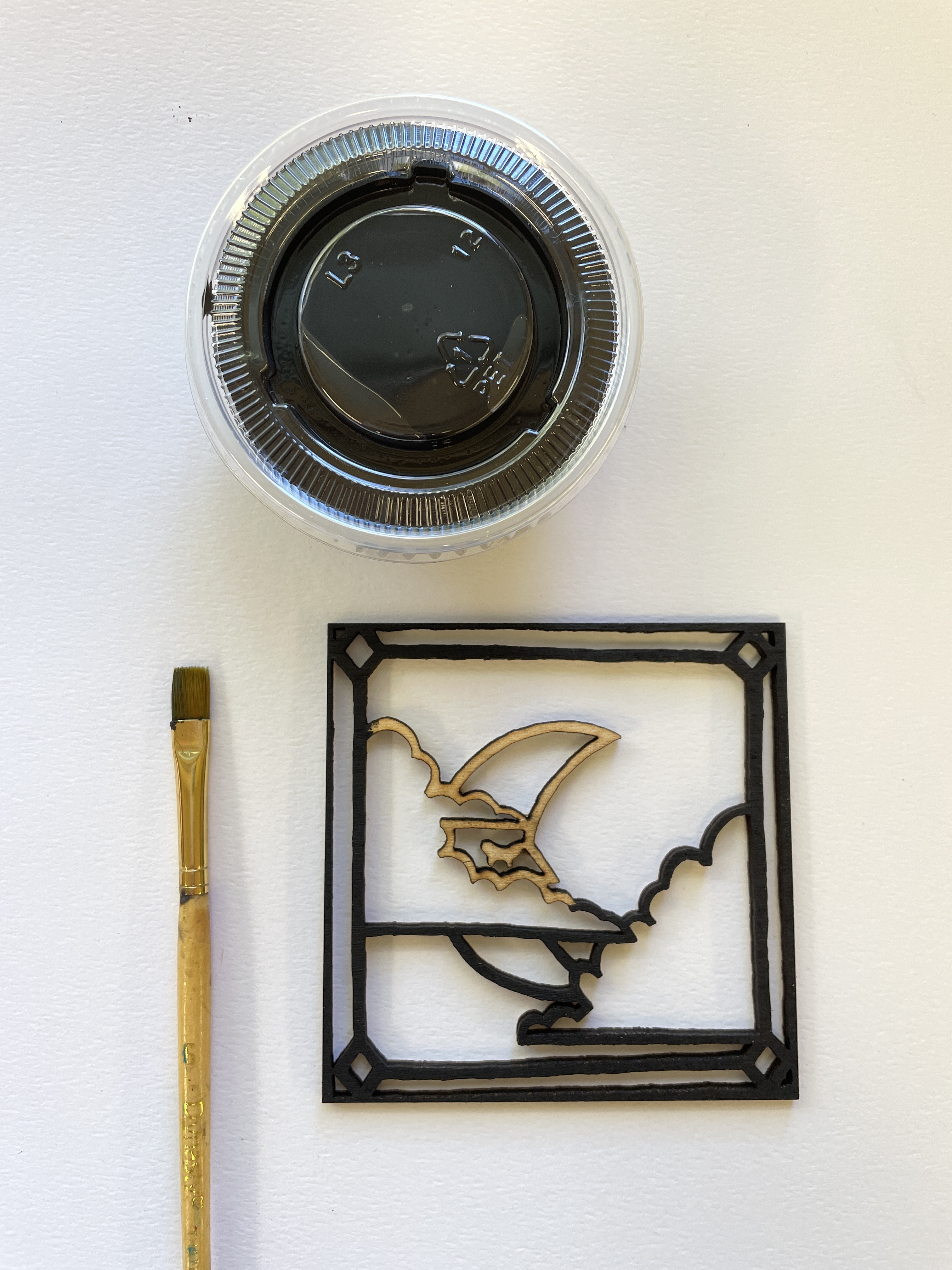


As we moved on in our daily lessons to positive and negative space, the temptation was too great, and I threw out my traditional lesson and had the students design a wooden stained glass suncatcher.  Most of the students wrapped up on Friday. There were a few absent who still need to assemble, but I am so proud of their efforts. 


They had to plan their design, photograph it with no keystoning or shadows and convert the file to an svg to create a cut path. I had students proof the machine as we ran a perimeter test and then their piece was cut. 


They painted the wood black and then inserted their colored acetate pieces on the backside. The machine takes 3-8 minutes to cut, depending on the complexity of their design, so I had a bunch of early finishers. Teacher brain kicks into overdrive and even though this is not when I normally teach printmaking I couldn't pass up the opportunity. I had students glue their cut out pieces to cardboard, leaving the space from the suncatcher empty. Did a quick demo to the first student to ink up her plate and pull prints. Asked her to teach the next one who finished...and so on. 


A two for one project! They really enjoyed this and took turns printing from each other's designs. And now that they have this basic understanding of printmaking, we should be able to go deeper when we actually get to that unit!


Friday, July 23, 2021

STEAM Art Teacher Inservice

This summer I've been participating in an amazing intensive 5 day steam boot camp. Here are some of the fun things we've gotten to try:

Creating Circuits with Makey Makey using play-doh and graphite


3D printing using tinkercad

After about 3 hours on the 3D printer I was able to take home my coded geometric design. This could have some fun printmaking applications.


3D lasercutting with dremel and beamo


Coding with "The Artist" on code.org and block coding with scratch

I've been working on an idea for my contemporary crafts class this fall. They would design a piece of jewelry using the 3D printer or the laser cutter. Here is me failing forward with a cuff bracelet design.


There was an extra "line" that connected all the way across, which cause 1/2" to break off so I fixed the design and also tightened up the curve radius by placing the lines closer together. This was done in google drawing and lasercut on a Dremel Digilab.

The bracelet is placed into steaming hot water and then inside a mold (this time a tin can). Once the shape is stable, it was removed from the can and this binder clip was used to maintain the desired shape until it dried. Because of the living hinge it stays flexible so it can easily slid into place on the wrist.

Next, I designed a book cover. The cut path (spine and shape of book) was drawn in google draw. The pattern was created in procreate and exported as a jpg. This was my first attempt and the last day of class. I would definitely made some edits, but overall I'm loving it. This tiny post it note sized book took 40 minutes on the Dremel Digilab Lasercutter.


We had a fun day inservice provided by CodeJoy on hummingbirds by Bird Brain Technology. Working in groups we illustrated a poem using lights, motors and sensors. Our group chose "One Fish, Two Fish, Red Fish, Blue Fish."


We did some collaborative warm ups prior to any group projects to help understand group dynamics. 
This rubber band cup activity was fun. We finished early so decided to try differentiating it by using two members with 2 hands who worked blind while two of us coached.


We ended the week with some lesson sharing. Can't wait to get some of this tech into my students' hands.


Saturday, March 20, 2021

Earth Day Art Lessons Your Students Will Love

For art teachers, it's a happy coincidence that Earth Day happens in late spring. The time of year when the tiny scraps of recycled paper are overflowing. You may have a mound of them sitting to the side of your paper cutter right now. Here are some of my favorite ways to recycle every last bit. Let's face it, with our budgets, we can't afford to toss any scraps.

PAPER POTTERY / MAGAZINE BOWLS

Is your librarian ready to toss this year''s magazines? You can make bowls, dishes or vases using nothing more than tape. Bowls can be permanently sealed into position with mod podge. Original post here. I have a recorded video lesson for students working from home here.


PULP PAINTING & PAPERMAKING

When the pile of scrap next to your paper cutter is overflowing, it's time to make paper! Two fun ways to do that are traditional papermaking and pulp painting.


PAPER WEAVING

Those long 1" strips are just perfect for tiny fingers to practice their weaving skills. In spring time, a woven sheet of 9x12 or 12x18 becomes the perfect picnic blanket background. I like to talk about geometric vs organic shapes as they add items onto their plate.


PAPER MOSAICS

When those weavings are done, go ahead and trim those 1" paper strips into squares (or better yet, let your early finishers do it for you) and start paper mosaics. I'm serious about using every last bit of paper. This project is loved by children of all ages, and I find the sweet spot to be grade 2.


For a quick organizing tip, I use small containers and sort the paper by color. During the pandemic you could have students cut their own paper strips into squares and keep them in a baggie.


PROFILE PENDANTS

Invite your artists to bring recycled plastic to class. These Arcimboldo inspired pendants would make an amazing Mother's Day gift. Original post with more info here. This could also be done at home with the help of an adult for shrinking the plastic in the oven. Only sharpies are needed.


PAPER COLLABORATIONS

Put those 1" leftover weaving strips to use with this Suzan Shutan inspired paper sculpture. Students can practice folding, curling, gluing and stapling.


 I have kinders add a dot of glue, pinch the loop and count to ten. I show them how not holding it tight for 10 seconds will cause the loop to open up. They can bring their loop forward, point to where they want it added and you can hand over hand help them learn to staple it to join the collaborative sculpture. 


They love to "find" their loop in the larger work. Original post about kindergarten paper collaborations may be found here.


MARKER PRINTS
If you're a fan of The Speckled Sink, then you already know how I feel about marker prints. This year, most students can successfully wrestle up a piece of foam and either a marker for printing or maybe a crayon to do a rubbing.  I have successfully done this with K-12 (yup, all the ages) and it never fails to delight. Corn, Gingerbread, Surrealism, Snowflakes, Fish. It really doesn't matter what you choose. They will love it!


ROBOT DESIGN
Put all the things you're trying to get rid of and let the students go to town. Can they make a robot? A shoe? A utensil? Can they build a bridge? Great steam integration.


What is your favorite lesson for Earth Day? Here's a bundle of some of my favorites.


Thursday, November 19, 2020

Animation for all ages


There is something about an animation lesson that just hooks kids every time. Thanks to GIFS, tik-tok and boomerangs our students are already well versed on moving pictures. While it was never expressly part of my curriculum, I always tried to sneak a little bit of animation in when I could.


K-2 students absolutely can master some of the basic animation devices like roll ups and thaumatropes. For the littles, I prefer a circle or square on a stick or straw to string, but I usually show them both and let them choose. Two years ago I did an animation station at my elementary STEAM night and the kids (and parents) had so much fun making both of these items. I've also used them as part of my art center and free choice day.


3-5 students love jumping into more complex ideas and if you have access to technology, this might be a great time to work in a little stop motion. A few years back I wrote a grant to get enough white boards and modeling clay for a grade level of 3rd graders. They worked in teams to create animated shorts. They did their titles with dry erase, and their videos were claymations using the stop motion studio app. A few adventurous kids, brought the videos into iMovie and added sound. Original behind the scenes post here.


Middle schoolers will love any of the above PLUS they might have the patience to do an old school zoetrope, phenakistoscope or flip book. My fifth graders were able to do some basic animations in procreate last year. This year, I dedicated a healthy portion of my budget to purchase a procreate license for each of my cartooning students. Using the animation assist feature, they are starting to animate characters they designed. 


We started by examining anthropomorphism and they are working to bring to life an inanimate object. Their first mini assignment was a single action sequence. A wave, a hop, a blink. It's really important for them to separate a single action from a broader term (like "dancing") as many kids will be ready to go with a whole plotline. This student's "nervous" candy is really sweating it out on halloween.


From there, we did a basic squash and stretch activity in procreate with basic shapes. This is how they learned to identify their keys (extremes). We used animation assist to speed up the drawing process.


They are now sketching out a more advanced movement sequence. It's so much fun to watch their ideas come to life. How about frame 5 on this adorable origami boat. I love how he's peeking to check that the coast is clear.

With strong connections to science, writing and math I can guarantee your principal will never complain about you teaching animation in art! If you'd like some help with lesson plans for these ideas you can click the links above for the original posts or you can view my lesson plans:

Historical Animation devices

Animation with Procreate

Stop Motion Lessons


Sunday, July 12, 2020

Professional Development

This summer I elected to participate in a cohort of teachers to receive professional development for STEAM. My kit arrived and we start Wednesday. I have no idea what we will be doing with any of this, but I'm excited to get started!


Participation in this two year on-going program will give me access to a lending library of 3D printers laser cutters/engravers and classroom set of programmable electronics.

Wednesday, April 22, 2020

Distance Learning Week 4

This week we are exploring with Paper, Pencils and Pixels. While many of my students may not have paint and other art supplies, every student in grade 3-5 was offered an ipad with procreate loaded onto it. Having a digital option for students each week ensures that these students can engage beyond a basic pencil and paper activity. It's only been two days and already some amazing results have been rolling in. Take a peek:

Our choiceboard this week included:
Cartooning


Hybrid animal drawing using switchzoo

This has clearly been a favorite across grade levels


Paper Airplane Challenge Inspired by Teach Outside the Box

Origami


Victor Nunez inspired doodles

Mask Making


Which activities are your students loving?


Sunday, March 22, 2020

Fun and games distance learning

As I sit here I can't help thinking about 200 pieces of unglazed pottery that I unloaded from the kiln the week before we shut down. In the grand scheme of things, no big deal. But wondering if I'll see my 5th grade students again to at least pass back the work. It looks like we're a long way from completing "real art" with our students, so I'm trying to focus on what the next stage looks like.


At this point, our district is consolidating efforts to offer a calendar / menu style of offerings for the specials. Some of the choices might be creative brain breaks with things like an art scavenger hunt / eye spy or the circle game. These are things that I may have used traditionally on the last day of class, or for free art day.


While our 3-5 students may have access to technology, student access to internet and art supplies will not be equitable so part of the decision process is whether an activity can be completed with pencil and paper if that's all they have. To that end, I'm looking at things with high engagement, like old school animation devices. Flip books, Roll ups and Thaumatropes. I created a video demo for the roll up idea for those who may have internet access, but there's also a handout that easily explains the idea with pictures.


This was something I offered during STEAM night, but most students only made one item or played with the samples that were available. I think some of the students will really dig in and perhaps step up to a flip book given the extended time they have to work on it.


How are you preparing for distance learning? Is your department working together to share resources or are you on your own? Are you teaching traditional projects, or supplementing with more prompts and activities? I'm thinking more found object sculptures, collages and sidewalk chalk art as the temperature begins to rise.


I put together a FREE sampler of 3 favorite low budget no-prep activities to try. Enjoy!